Tag: Summer Learning Journey

SLJ (Silhouette Art) Kick start Activity 33

Kia Ora, welcome back to my blog.

Today I am going to show you my Silhouette Art I made today. This activity was cool to make because instead of making it by hand, I made it on google slides. It was much easier doing it on google slides then on paper. If you want to make this activity follow the steps.

Steps:

Ako | Learn

For the learn part, I first watched a video of easy Silhouette Art ideas. Watch the video below. Next I watched another video of someone making a beautiful and wonderful sunset painting. Watch the video below too. Finally for the learn part, I explored some Silhouette Art examples. Here are the videos and the Silhouette Art example.

.

Video 1

Video 2

Hanga | Create

For the create task I designed my own summer silhouette image on google slides. But before that I followed some instructions, here are the instructions.

Here is the link of remove.bg

Here is a screencastify showing you what to do, and here is the link of the template.

Tohatoha | Share

Lastly for share I have to take a screenshot of my silhouette image from my google slide template. Then I have to upload it to my blog. I hope you enjoy this task.

Here is my Silhouette Art

SLJ (Summer Holiday 101) Step it up Activity 32

Talofa, welcome back to my blog.

Today I am going to share my Step up activity which is calles Summer Holiday 101. In the last task I did this about Winter holiday 101, if you haven’t read the kick start activity make sure you read it. This activity is the same as the kick start activity it’s just that I have to add stuff about summer instead of winter. Follow the steps if you want to create this activity. If you don’t want to create this activity go to the bottom and see my Holiday plan.

Steps :

Ako | Learn

For the learn part, I had to first watch a video about ‘My Summer Vacation’. If you want to watch the video, check it out below the text. Next I watched a video called ‘Summer holiday’ Cliff Richard, if you want to watch the video check it out below. Finally for the learn part, I had to read or listen to the Ring story. I don’t want to spoil the story by telling you guys so have a read or listen.

Video 1

Video 2

Hanga | Create

For the create task I made a copy of the Summer Holiday 101 task, I read through the instructions to know what to do. Enjoy making this task and comment below where you would want to go in the summer holidays (Also who would you like to go with.)

Tohatoha | Share

Finally for share, I had to post my Summer Holiday 101 plan, and my blog post I have to share my favourite activity to do during the holidays.

My favourite summer activity

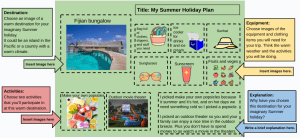
Here is my Summer Holiday 101 task

Summer Learning Journey (Winter Holiday 101) Kick Start Activity 31

Kia Orana, welcome back to another blog post.

Today I am going to share my Kick start activity which is called Winter Holiday 101. I had to create a winter holiday plan. This activity was pretty cool, if you want to make a winter holiday plan follow the steps below.

Steps :

Ako | Learn

First I watched a video called what to do in winter, the video shows some ideas of what we do in winter, watch the link below the text. Next I watched another video about Winter in New Zealand. Here are the 2 videos below.

Video 1


Video 2

Hanga | Create

Next for the create task, I made a copy of a template to create my winter holiday 101. There are instructions on the side to guide you. I hope you enjoy an create a wonderful plan.

Tohatoha | Share

Lastly for share, I had to share my Winter Holiday 101 plan on my blog. In my blog post I have to tell you one holiday destination I would like to visit and why.

I would like to go to Queenstown because the scenery is very nice there, and the rides are very fun. I have been to Queenstown before and it was very fun there, we went on the luge and gondola ride, ate their famous burgers and also went on the Go Orange boat too, I love Queenstown so much.

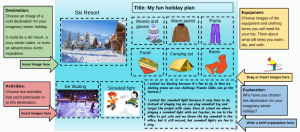
Here is my Winter Holiday 101

These are the stuff I saw in Queenstown

SLJ (Poem Postcard) Step it up activity 30

Hello, welcome back to my blog.

Today I am going to share my step it up activity of Poem Postcard. I would say the step it up activity was way more fun then the kick start. This activity I had to make a postcard on google drawing, and it also included google drawing, if you want to make the postcard follow the steps.

Steps :

Ako | Learn

For the learn part I watched a demo of what to do in the google drawing. But in the google drawing link there added instructions so you can follow that, just zoom a bit out to see all the things on the side.

Hanga | Create

Next for the create, I had to first think of a place I have been or dreamed of or going too. Then I had to make a copy of the google drawing template. Using the polyline tool I could recreate the images on the side or make my own of what I was dreaming or where I am going to. I created 1 of the images on the side because I didn’t have any idea of what to create. On the side I had to add a message or a poem, I did a poem of a Haiku.

Tohatoha | Share

Lastly for share, I had to download my google drawing as a PNG and share it on my blog. I had to answer a question which is – Why would my image make a great place to visit and who would I go with.

My image would be a great place to visit because the sunset scenery is the best. I would go with my family.

Here is my Poem Postcard

SLJ (Ping Pong Battle Games) Kick start Activity 29

Hello, welcome back to my blog.

Today I did a challenge called Ping Pong Battle games. We had to make a video of us playing ping pong in our way, there was a video of Dude Perfect that inspired me to create this game. My brother and I did this challenge together because the instructions said to do it with a mate or a sibling.  Here are the steps I followed.

Ako | Learn

Here are the instructions for the learn part – Be inspired by this Dude Perfect Video.Go the 2:01 to find the ping pong challenge they did. Next is to watch how they use a plastic bottle to ping pong balls on their head. You will need a pingpong ball/s (or something similar) for this challenge.

Hanga | Create

For the create part I had to – Design your own ping pong battle game based on what you saw in the video. Create your own ‘Catcher’. Think about how you will time it and record the process. Gather a sibling or a mate and record your challenge as it happens.

Tohatoha | Share

Lastly for share I had to share it on my blog, share the design process for the ping pong battle, as well as the final game battle.

Here is the design and video of the ping pong video.

Design of what the ping pong game is going to look it

Here is the video we made:

SLJ (Poem Postcards) Kick start activity 28

Hello, welcome back to my blog.

Today I am going to share with you my Poem Postcard activity I did today. This activity was super easy. I think you guys are going to enjoy making postcards right? Follow my steps and you can make a postcard for your family, friends etc.

Steps :

Ako l Learn

First I watched a video of a demo so I know how to create it. The video showed how to use it but I can’t share the video but let me tell you step my step. I am going to send the link in the create activity, and when you click it once it loads press, Lunch experiment. Next at the bottom there’s a option called More artwords, click on that. Now you can choose any of the artworks you want, if you see at the bottom you can go to the next page as well. Once you selected any picture you want. Pick any type of poem you want, to change the poem click on the Sonnet and there will give more options, you can choose whatever poem you want. If you want to write words about your picture you can it’s optional, I wrote a couple of words so it can add those words in my poem. Once you do those steps click on write a poem, it will write the poem itself so you don’t need to write it.

Hanga l Create

Now for the create part I had to create a postcard, I used an app to create my post card, if you follow the steps in the learn part you will know how to use it. If you want to try this app here is the link. Also I had to take a screenshot and copy the link.

Tohatoha l Share

Finally for share,  I have to write who I would send the postcard to and why, and also why I picked that image, then I insert my screenshot and add the link to my postcard.

I would send the postcard to my brother because I made my postcard about space and he likes space. I got the image of the earth which is counted as space.

Questions

Who would you send your postcard to and why?

What was your postcard about?

Did you enjoy making the postcard?

Here is my Postcard

Poem Postcard

SLJ (Tessellation) Step it up activity 27

Hello, Happy new year and welcome to my blog.

In today’s task I did the step up activity of Tessellation. This activity is the same thing as the kick start but I had to create something else. This activity was fun, follow along if you want to create this activity too.

Ako l Learn

1st I watched a video about Tessellations, semi regular tessellations and irregular tessellations. Watch the video underneath this text. Then I supposed to read this article but this was the same article as the kick start activity, if you scroll up you will find more information, here is the article.

Here is the video

Hanga l Create

For the create task I used the app called Polypad again to create my own semi – regular or irregular tessellation, once I finished the tessellation I took a screenshot.

Tohatoha l Share

Finally for the share part I had to share my screenshot on my blog, and I also have to tell what type of tessellation I made. Also I had to tell what the difference between semi-regular tessellation  and  irregular tessellation is. Instead of me answering I would like you guys to comment the answer. Good luck and give me feedback on what I should do better.

Here is my Semi Regular Tessellation

SLJ (Tessellation) Kick Start — Activity 26

Hello, Happy new year everyone welcome back to my blog.

Today I am going to share my Tessellation activity, in this activity I had to create my own tessellation, good I already knew what tessellation is so I could skip some of the video. If you want to make your own tessellation follow my steps.

Steps :

Ako l Learn

1st I had to watch a video called tessellation with shapes. The video explains what tessellation is, have a look at the video below this text. Next I watched another video also explaining what tessellation is but also they explain what regular polygons are, Tessellate and regular tessellations are. Now finally for the ako l learn part I had to read what tessellations are. Here is the link if you want to read it and watch the 2 videos underneath this text.

Video 1

Video 2

Hanga l Create

For the create part, I used an app called Ploypad, an online tool to create my own tessellation with regular polygons. After I finish my tessellation I took a screenshot.

Tohatoha l Share

Lastly for sharing I had to share the screenshot on my blog. Please give me feedback on what I should do better.

Questions for you to answer

1.What is Tessellation – (Don’t look back at the video)

2.What is Tessellate –

3.Did you enjoy this activity-

Give your answers in the comments.

Here is my tessellation

SLJ (Shadow Art) Kick start activity 25

Hello, welcome back to my blog.

In today’s activity I am going to share my shadow art I did. shadow art is a type of art where you get an object, and place it on your paper then the shadow will appear of that object you put there. I did one about a butterfly using it soon. If you want to make these smart and cool drawing ideas follow the steps.

Steps :

Ako l Learn

For the learning art I just had to follow 1 step which is to watch this video about shadow art instructions here is the video.

Hanga l Create

Shadow Art

Step up your paper so that an object nearby creates a shadow . Trace around it, then if you’d like to colour it in and make a background to go with it. I coloured the butterfly but i didn’t add a background, you can do it if you want.

Tohatoha l Share

Lastly for share, I had to take a picture of my art and share it on my blog. I also had to write a comment that tells you what the easiest part was and what the hardest part was.

The easiest part was to draw the butterfly, but the hardest part was to set the angle of the flashlight so the spoon could stay in the right place. I used a tripod to settle my flashlight in the right place. I also had a times lap video to show you.

Here is my picture and the video

SLJ (Vibrant Viola ) Step it up Activity 24

Bonjour, welcome back to my blog.

Today I are going to listen another Vibrant Viola music I made today, this music is going to be different because for the kick start activity I did consert mode and for this task I had to do freestyle mode, so I can play any beat I want. Here are the steps if you want to try the freestyle mode.

Steps :

Ako l Learn

For the learning part I 1st had to watch a video called “Ode to Joy” Flashmob style, it was where 1 person was playing a violin and other people joined him to make wonderful music. Here is the link to listen to the music. Then I supposed to read about Beethoven but this one was working either but if it works for you here is the link. Finally for the learning task I read about “Ode to Joy.” This link actually worked, here is the link “Ode to Joy.”

Hanga l Create

For the create task I had to play the cello with Viola the bird freestyle and compose my own music. If you are on the link, at the stop of the screen there are 2 options which are Concert and Freestyle, click on the freestyle to play your own music.

Tohatoha l Share

Lastly for share, I had to share the link of my performance on my blog. I also had to tell you a bit about the music I made and what it makes me think of. Well the music makes me think of nothing. The music I created is random, but I tried, this was a fun task.

Here is my music

Music